This project was developed for the subject Coding and Health Information Management (CGIS) during my third year of my degree. The main objective is to design, model and develop a web application for the management of hospital stretchers in a health institution.


Table of Contents
Problem Domain
Bed management in a hospital is one of the daily tasks. of any admission service and also one of the ones that causes the most conflicts in the daily operation of the hospital. The allocation of the bed to the patient who is going to be admitted is only one part of what is called Bed Management, and affects both the patients who are going to be admitted and those already admitted, and the free beds as well as the occupied ones.
Objectives
The requirement of an adequate control in the occupation of hospital stretchers requires an adequate management of the information, a knowledge about the different stretcher rooms, types of stretchers, their occupation, doctors in charge of each patient who will have an assigned room, etc.… Given this situation, it is proposed to create a web application where each user will have their own access.
System users
The three users who will be able to access the system will be: - Administrator - Attendant, will only be able to view the data that corresponds to him.
- Doctor, will only be able to view the data that corresponds to him.
Catalog of requirements
Information requirements
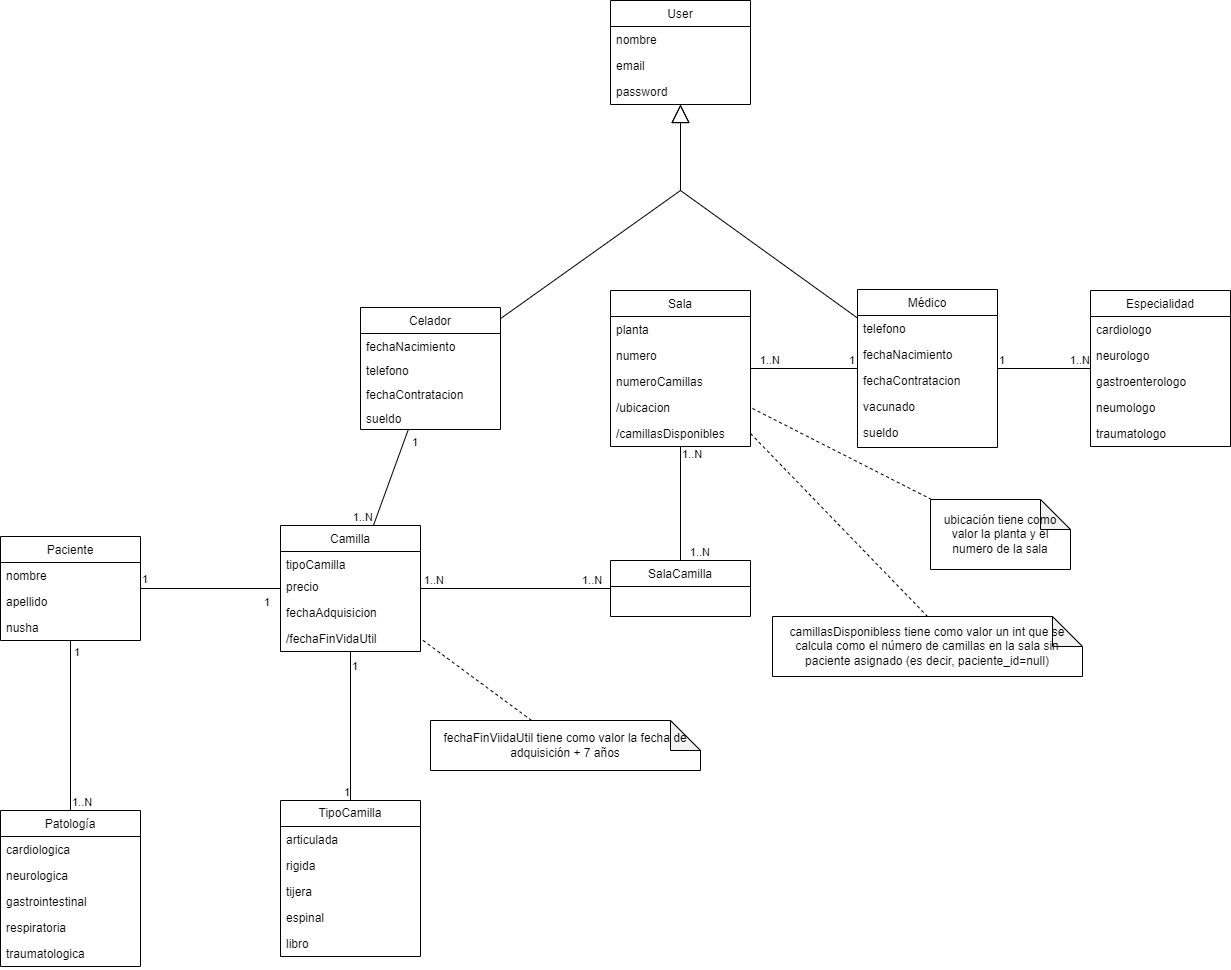
RI-001. Doctors. The system must store information about doctors. First and last name, password, specialty, date of birth, whether or not they have been vaccinated against COVID, phone number, salary, and date of hiring.
Each doctor will be in charge of (1..N) rooms. One doctor is in charge of N patients. One doctor has (1..N) specialties.
RI-002. Orderlies. The system must store information about orderlies. First and last name, password, date of birth, phone number, date of hiring, and salary.
Each orderly will be in charge of (1..N) rooms. One orderly is in charge of N patients.
RI-003. Patients. The system must store information about patients. First and last name, nuhsa, and pathologies.
Each patient has (1..N) pathologies. 1 patient is associated with 1 stretcher.
RI-004. Rooms. The system must store information about the rooms. The floor on which the room is located, the room number, the number of stretchers available in the room, as well as the doctor assigned to the room.
N rooms have N stretchers associated with them.
RI-005. Stretchers. The system must store information about the stretchers. Type of stretcher, attendant responsible for the stretcher, patient associated with the stretcher, price, date of acquisition and end of useful life date.
N stretchers belong to 1 company.
RI-006. Specialty. The system must store information about the doctors’ specialties. These can be: cardiologist, neurologist, gastroenterologist, pulmonologist and traumatologist.
RI-007. Pathology. The system must store information about the patients’ pathologies. These can be: cardiological, neurological, gastrointestinal, respiratory and traumatological.
Functional requirements
RF-001. List of doctors. As an administrator, I want to see a list of the doctors in the system paginated 10 by 10.
RF-002. Doctor details. As an administrator,** I want to see the details of a doctor.
RF-003. Doctor creation. As an administrator,** I want to create a doctor. To do this, you must indicate the name and surname, specialty, date of birth, email, phone number, ID, whether or not he/she has been vaccinated against COVID, salary, and date of hiring. I should be able to choose the doctor’s specialty from the list of specialties already existing in the system’s database. The system should prevent the creation of a doctor if: - The email already exists.
The email is not in the correct format.
The password is not at least 8 characters long and the password and its confirmation are included.
The salary cannot be negative - The specialty must be one of those already available in the system.
The system should also display an error message in each of the above cases and, if successful, navigate to the updated list of doctors with a success message.
RF-004. Editing a doctor. As an administrator,** I want to edit a doctor by choosing him from the list of doctors and taking me to a new screen where I can work with the data. To do this, I should be able to modify the first and last name, email, date of hiring, whether or not he has been vaccinated against COVID, salary and specialty. I should be able to choose the doctor’s specialty from existing in the system database. The system must prevent editing of a doctor if:
The email is not in the correct format.
The password is not at least 8 characters long and the password and its confirmation are included.
The salary cannot be negative
The specialty must be one of those already available in the system.
The system must also display an error message in each of the above cases and, if successful, navigate to the updated list of doctors with a success message.
RF-005. Deleting a doctor. As an administrator, I want to delete a doctor. The system must alert me of the irrevocability of this action and ask for confirmation. If confirmed, the system must delete the doctor and navigate to the updated list of doctors with a success message.
RF-006. List of doctors. As a doctor, I want to see a list of the doctors in the system.
RF-007. Doctor details. As a doctor,** I want to see the details of a doctor.
RF-008. List of caretakers. As an administrator, I want to see a list of the caretakers in the system paged 10 by 10.
RF-009. Caretaker details. As an administrator,** I want to see the details of a caretaker.
RF-010. Caretaker creation. As an administrator,** I want to create a caretaker. To do this, you must indicate the name and surname, date of birth, phone number, email, date of hiring and salary. The system must prevent the creation of a caretaker if:
The email already exists.
The email is not in the correct format.
The password does not have at least 8 characters and the password and its confirmation are included.
The salary cannot be negative
The system must also display an error message in each of the previous cases and, if successful, navigate to the updated list of caretakers with a success message.
RF-011. Editing a porter. As an administrator,** I want to edit a porter by choosing him from the list of porters and taking me to a new screen where I can work with the data. To do this, I must be able to modify the name and surname, date of birth, phone number, email, ID, date of hiring and salary. The system must prevent the editing of a doctor if:
The email is not in the correct format.
The password is not at least 8 characters long and the password and its confirmation are included.
The salary cannot be negative
The system must also display an error message in each of the above cases and, if successful, navigate to the updated list of doctors with a success message.
RF-012. Deleting a porter. As an administrator, I want to delete a porter. The system must alert me of the irrevocability of this action and ask for confirmation. If confirmed, the system must delete the porter and navigate to the updated list of porters with a success message.
RF-013. List of orderlies. As an orderly, I want to see a list of all orderlies in the system.
RF-014. Orderly details. As an orderly,** I want to see the details of an orderly.
RF-015. List of patients. As an administrator, I want to see a list of the system’s patients paged 10 by 10.
RF-016. Patient details. As an administrator,** I want to see the details of a patient.
RF-017. Patient creation. As an administrator,** I want to create a patient. To do this, I must indicate the name, surname, Nusha number and pathologies. I must be able to choose the patient’s pathology from the list of pathologies already existing in the system’s database. The system must prevent the creation of a patient if:
- The pathology must be one of those already available in the system.
The system should also display an error message in each of the above cases and, if successful, navigate to the updated list of patients with a success message.
RF-018. Patient editing. As an administrator,** I want to edit a patient by choosing him from the list of patients and taking me to a new screen where I can work with the data. To do this, I should be able to modify the first and last name, Nuhsa number and pathologies. I should be able to choose the patient’s pathology from the list of pathologies already existing in the system’s database. The system should prevent patient editing if:
- The pathology has to be one of those already available in the system.
The system should also display an error message in each of the above cases and, if successful, navigate to the updated list of doctors with a success message.
RF-019. Patient deletion. As an administrator, I want to delete a patient. The system should alert me of the irrevocability of this action and ask for confirmation. If confirmed, the system should delete the patient and navigate to the updated patient list with a success message.
RF-020. Patient List. As a physician, I want to see a list of all patients in the system.
RF-021. Patient Detail. As a doctor,** I want to see the details of a patient.
RF-022. Patient list. As an orderly, I want to see a list of all the patients in the system.
RF-023. Patient details. As an orderly,** I want to see the details of a patient.
RF-024. Stretcher details. As an orderly, I want a list showing all the information about the stretchers assigned to me.**
RF-025. Stretcher prices. As an administrator, I want a list showing the total price of the stretchers in the hospital.
RF-026. Assigned rooms. As a doctor, I want a list of all the rooms assigned to me, along with the stretchers that belong to the room.
RF-027. Assigned stretchers. As an orderly, I want a list of all the stretchers assigned to me, along with the associated patient.
RF-028. Total inventory cost. As administrator, the total cost of the stretchers.
RF-029. Annual cost of workers. As administrator, I want to see a list of the salaries (the cost that they would have in 12 months) of each of the workers.
RF-030. Total cost of workers. As administrator, the total cost in one month of the current workers of the company.
RF-031. List of pathologies. As administrator, I want to see a list of all the pathologies in the system.
RF-032. Creation of pathology. As administrator,** I want to create a pathology. To do this, the name of the pathology must be indicated.
RF-033. Editing pathology. As administrator,** I want to edit a pathology by choosing it from the list of pathologies and taking me to a new screen where I can work with the data. To do this, the name of the pathology must be able to be modified.
RF-034. Deleting a pathology. As administrator, I want to delete a pathology. The system should alert me of the irrevocability of this action and ask for confirmation. If confirmed, the system should delete the pathology and navigate to the updated list of pathologies with a success message.
RF-035. List of specialties. As an administrator, I want to see a list of all the specialties in the system.
RF-036. Creating a specialty. As an administrator,** I want to create a specialty. To do this, the name of the specialty must be indicated.
RF-037. Editing a specialty. As an administrator,** I want to edit a specialty by choosing it from the list of specialties and taking me to a new screen where I can work with the data. To do this, the name of the specialty must be able to be modified.
RF-038. Deleting a specialty. As an administrator, I want to delete a specialty. The system should alert me of the irrevocability of this action and ask for confirmation. If confirmed, the system should delete the specialty and navigate to the updated list of specialties with a success message.
RF-039. List of stretcher types. As an administrator, I want to see a list of all stretcher types in the system.
RF-040. Creating a stretcher type. As an administrator,** I want to create a stretcher type. To do this, the name of the stretcher type must be indicated.
RF-041. Editing a stretcher type. As an administrator,** I want to edit a stretcher type by choosing it from the list of stretcher types and taking me to a new screen where I can work with the data. To do this, the stretcher type must be able to be modified.
RF-042. Deleting a stretcher type. As an administrator, I want to delete a stretcher type. The system should alert me of the irrevocability of this action and ask for confirmation. If confirmed, the system should delete the stretcher type and navigate to the updated list of stretcher types with a success message.
Non-functional requirements
RNF-001. Security: The system should be protected against unauthorized access.
RNF-002. Performance: The system should be able to handle the required number of users without any degradation in performance.
RNF-003. Scalability: The system should be able to scale up or down as needed.
RNF-004. Availability: The system should be available when needed.
RNF-005. Maintainability: The system should be easy to maintain and upgrade.
RNF-006. Portability: The system should be able to run on different platforms with minimal changes.
RNF-007. Reliability: The system should be reliable and meet user requirements.
RNF-008. Usability: The system should be easy to use and understand.
RNF-009. Compatibility: The system should be compatible with other systems.
RNF-010. Compliance: The system must comply with all applicable laws and regulations.
Business Rules
RN-001. An orderly can only be assigned a maximum of 10 stretchers at a time.
RN-002. A doctor can only be assigned a maximum of 2 rooms at a time.
RN-003. The orderly’s salary must be in accordance with the between 1200 and 1400 euros.
UML conceptual model